- Sign in to blogger.com and access your Blogger Dashboard.
- Beside the blog you want to delete, click the drop-down menu to the right of the gray Post List icon
.
- Select Settings.
- Click Other (under Settings) on the left side of the page.
- At the top of the page under "Blog tools" click Delete blog.
- Click Delete this blog.
Thursday, July 3, 2014
How to delete a blog

Benefits of Sport
Benefits of making Sport
I will show you some benefits of making sport that it is good to know them:
-Making Sport burns calories-you are also burning these extra pounds.
-Making Sport is improving your strenght and agility which is good for your body.
-Also making sport boosts your confidence.
-Making sport improves your leadership skills.
-Making Sport burns calories-you are also burning these extra pounds.
-Making Sport is improving your strenght and agility which is good for your body.
-Also making sport boosts your confidence.
-Making sport improves your leadership skills.
I'll think more and come with an edit.
Sport-Getting started
Today, I am starting a new section about sport. I hope you will like my posts.
How to post on your blog - TUTORIAL
Do you want to post on your blog? If yes, then follow my steps:
1)Go to www.blogger.com
2)Log in your account
3)Press the orange pencil located near the blog that you want to post in.
4)Choose a title and write the content.
5)Press Publish
My YouTube Channel
You can find my YouTube channel by accesing this page: https://www.youtube.com/user/AnaKk1N
How to make a blog
Do you want to create your own blog? If yes , then you are in the right place. In this post I`m gonna show you how to create your own blog using www.blogger.com So, let`s get started.
1) Go to www.blogger.com
2)Login in your google account(if you don`t have one , create one)
3)Enter a "Display Name" to be used to sign your blog posts and click "Continue"
4)Click on "New Blog"
5)Select a Blog title and an available URL for your blog. Also, you can check if the URL is available by pressing the blue checked box.
6)Write the word verification and press Continue
7)Choose a template(your blog design) and press on "Create blog!"
Thats all. Now you can go to the URL written by you and see your new-created blog.
1) Go to www.blogger.com
2)Login in your google account(if you don`t have one , create one)
3)Enter a "Display Name" to be used to sign your blog posts and click "Continue"
4)Click on "New Blog"
5)Select a Blog title and an available URL for your blog. Also, you can check if the URL is available by pressing the blue checked box.
6)Write the word verification and press Continue
7)Choose a template(your blog design) and press on "Create blog!"
Thats all. Now you can go to the URL written by you and see your new-created blog.
How to Enable AdSense on your blog
- Click on the Earnings tab from the drop-down menu on your dashboard.
- You’ll then see the AdSense overview page. If you haven’t signed up for AdSense yet, click Sign up for AdSense.
- Select whether you'd like AdSense on the Google Account you're currently signed in to, or if you'd like to create a new Google Account.
- Complete the application form, review the information you've provided, and then agree to terms and conditions.
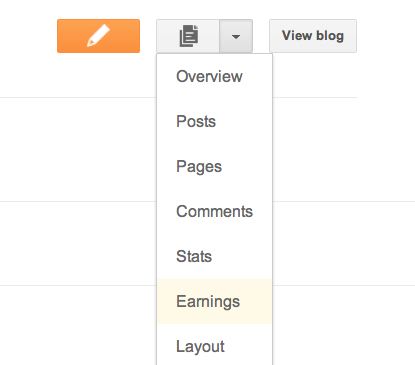
Ads will not appear on your blog until your application has been approved. Once you receive confirmation that your application was approved, you can control the ways the ads show up on your blog through the settings on the Earnings tab at anytime. It’s up to you whether or not to show ads, and where on your blog to display those ads (sidebar and posts, just sidebar, or just posts) if you’re using Traditional templates. Dynamic Views users can skip this step, as we’ve already optimized ad placement for Dynamic Views templates.
Content got from https://support.google.com/adsense/answer/50288?hl=ro
How to earn money via AdSense
Adsense-How to earn money using it
Adsense is a google product that you can make money with. The easiest ways to use adsense are:
1) To make a YouTube channel and an Adsense account. With these done, you need to link them and upload videos on YouTube, and then monetizing them with ads. It`s simple! After you make this you will earn money. How? Well, when the people press on the ads, you will recieve money. Why? These companies pays Google for showing their ads on YouTube. When you enable the monetize option, it`s just like you are saying to YouTube: "Yes, I let you to display ads on my video , but if you give me money when someone clicks on the ad".
2)To make a blog, using www.blogger.com You can make any blog you want, doesn`t really matter, but the content needs to be ORIGINAL.Just write about everything you want, and after your blog reaches some months old, you can display ads on your blog. When someone clicks on that ad, you earn $. Again, it`s simple. So to put ads on your blog, you need the following things:
- Your blog to be at least 3 months old(In some countries 6 months old)
-To be active, posting new content on your blog.
Conclusion
It`s easy to make money , by doing this. Just make one of the options that you see above, and thats all. You will earn money!
THANKS FOR READING!!
Subscribe to:
Posts (Atom)